
BEFORE YOU BEGIN
How to play God of War 3 on PC with 2.5.0: extract, select game data, save settings, press PLAY.
Prepare
How to play God of War 3 on PC: prepare first
Before following how to play God of War 3 on PC, confirm AVX and Vulkan 1.3 support. The launcher contains no game files.
Check for eboot.bin, sce_module and sce_sys. Documented builds: CUSA01623 / CUSA01715, version 01.00 / 01.02. Renaming a folder cannot change its build.
YourGame/
├── eboot.bin
├── sce_module/
└── sce_sys/Extract & open
How to play God of War 3 on PC: open the launcher
Verify the Windows package, extract the complete ZIP into its own writable folder, then open God of War III.exe. Never run it inside the archive.
When learning how to play God of War 3 on PC, keep the extracted package together. Copying just its executable leaves runtime files behind.
Select game data
How to play God of War 3 on PC: select your files
Next in how to play God of War 3 on PC: Choose game folder → Game → Browse. Select the directory containing eboot.bin. Home should show the title ID and version.
Select an Update folder only for a separate matching update. The launcher overlays it without editing source files. Do not mix title IDs.
Save & launch
How to play God of War 3 on PC: first launch
In Quick settings, choose display mode, resolution, frame-rate limit and engine rate. Save, then PLAY. Higher selectable rates do not promise achieved performance.
When learning how to play God of War 3 on PC, start at 60 FPS engine timing; some progression requires it. Preparation and shader compilation can delay startup.
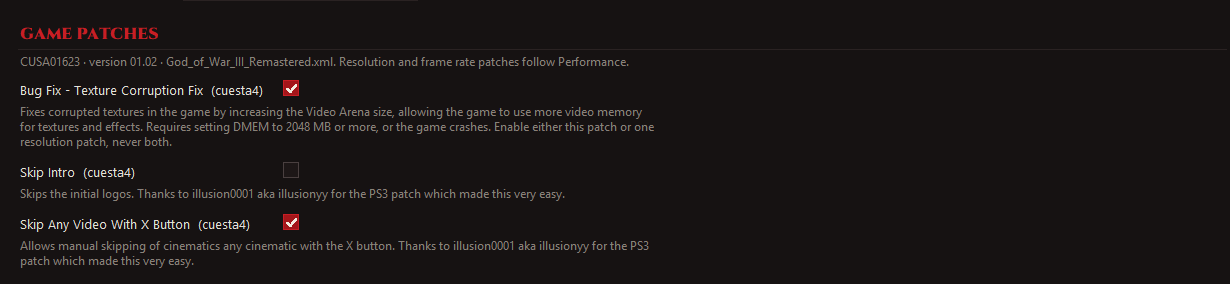
The upstream Game Patches screenshot illustrates the Mods interface. Its checked options are not a universal recommended preset.

Controls & saves
How to play God of War 3 on PC after setup
Learning how to play God of War 3 on PC with custom controls? Configure launcher bindings; open the in-game menu with Insert or R3 + L2.
After learning how to play God of War 3 on PC, relaunch God of War III.exe using saved settings. Back up the adjacent user folder before updates.
QUESTIONS & ANSWERS
How to play FAQ
How to play God of War 3 on PC without PS4 files?
You need compatible PS4 Remastered data. The launcher cannot replace it; original PS3 files belong to a different workflow.
How to play God of War 3 on PC when the game is not detected?
Check the directory level and required files. Compare the launcher’s title ID and version with the game-build guide.
How to play God of War 3 on PC with a controller?
Connect it, review launcher mappings, then check bindings in-game. R3 + L2 opens the menu; default mappings can differ.
How to play God of War 3 on PC after a stalled first launch?
Open Advanced → Log. Record the build, GPU, driver and last error before trying a targeted fix.
Curated by God of War 3 PC Guide.
Based on the version 2.5.0 README and release notes. Check latest releases for subsequent changes. No local gameplay benchmark was performed. Report a correction.